 Frickel
Deutsche Fassung dieses Beitrags lesen
Frickelalarm in detail: setting up the alarm system that lives in Home Assistant
 By Norbert Hengsteler
What started as a weekend project has become a full alarm system for Home Assistant: modes, delays, reactions, presence-based automation, its own Lovelace card – and, uniquely, configurable through services, so a language model can even set it up over the Home Assistant MCP server. Here's how.
A few days ago I announced Frickelalarm here – an alarm-system integration for Home Assistant that brings the whole alarm logic with it. Since then the scaffold has turned into a genuinely usable system. Time for a proper write-up: what can it do, and how do you set it up?
Code and releases are out in the open at github.com/ankaios76/frickelalarm.
What Frickelalarm does
You've got door and window contacts, motion sensors, a siren and a phone. Frickelalarm is the piece in between: a clean alarm_control_panel with its own state machine – arm, delay running, triggered, disarm again – set up entirely through the UI, no YAML.
- Modes home / away / night / vacation, each with its own sensor selection
- Exit and entry delays, instant sensors and "always armed" (smoke/tamper)
- Reactions: switch siren/light and send notifications
- Automation: arm when everyone has left, disarm on arrival, night mode on a schedule
- Tamper detection, bypass, panic, logbook events
- its own Lovelace card in the Frickelfabrik look
- configurable through services – so it can even be set up by an LLM via MCP
Installation
Since Home Assistant 2026.11, HACS is built in as the Marketplace (Settings → Marketplace). Custom repositories still work.
- Marketplace → menu (⋮) → Custom repositories →
https://github.com/ankaios76/frickelalarm, category Integration. - Download "Frickelalarm" (it's a beta – enable "Show beta versions" in the download dialog), restart Home Assistant.
- Settings → Devices & services → Add integration → "Frickelalarm".
Requires Home Assistant 2026.2 or newer.
The card
The integration ships its own Lovelace card and registers it automatically – no need to add a resource by hand. Drop it on the dashboard as a manual card:
type: custom:frickelalarm-card
entity: alarm_control_panel.haus_frickelalarm
name: House
keypad: collapsible   # optional: false | true | collapsible
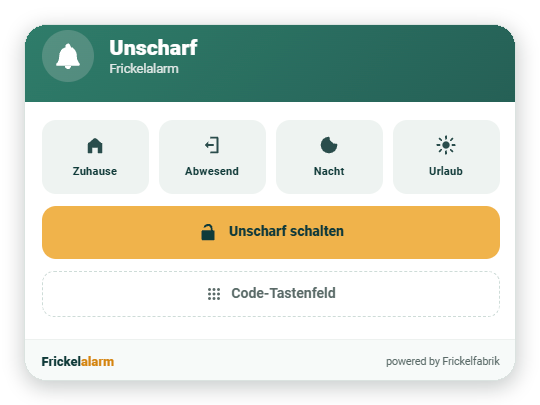
It shows the state in colour, a countdown during the delays, the trigger, open and bypassed sensors – and, if you like, a collapsible number keypad for the code.
Setting it up
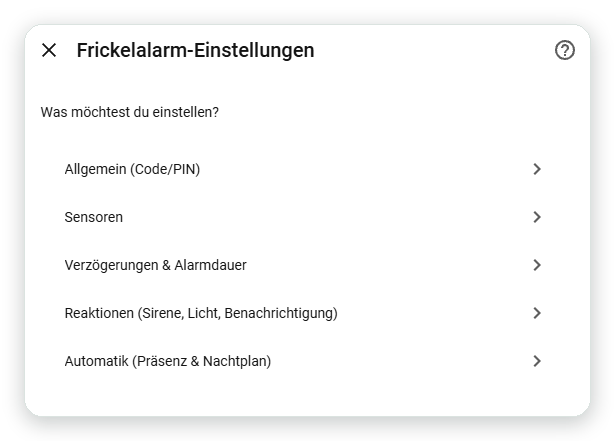
Everything can be changed at any time via Configure (the gear on the entry) – menu-driven:
- Sensors: pick door/window contacts, motion detectors … For each sensor: which modes it's armed in, "delayed" (uses the entry delay), "always armed".
- Delays & alarm duration: exit/entry delay and alarm duration in seconds.
- Reactions: actors (siren/light/switch) that turn on during an alarm and off afterwards, plus a notification service with a freely worded message.
- Automation: presence and night schedule (see below).
- General: code/PIN, tamper detection, and how open sensors when arming are handled (arm anyway / bypass & report / block arming).
Tip: put the front door on "delayed", but not the motion sensors – that way you can disarm when you get home, while an intruder coming through a window triggers immediately.
Automation: largely on its own
Under Configure → Automation:
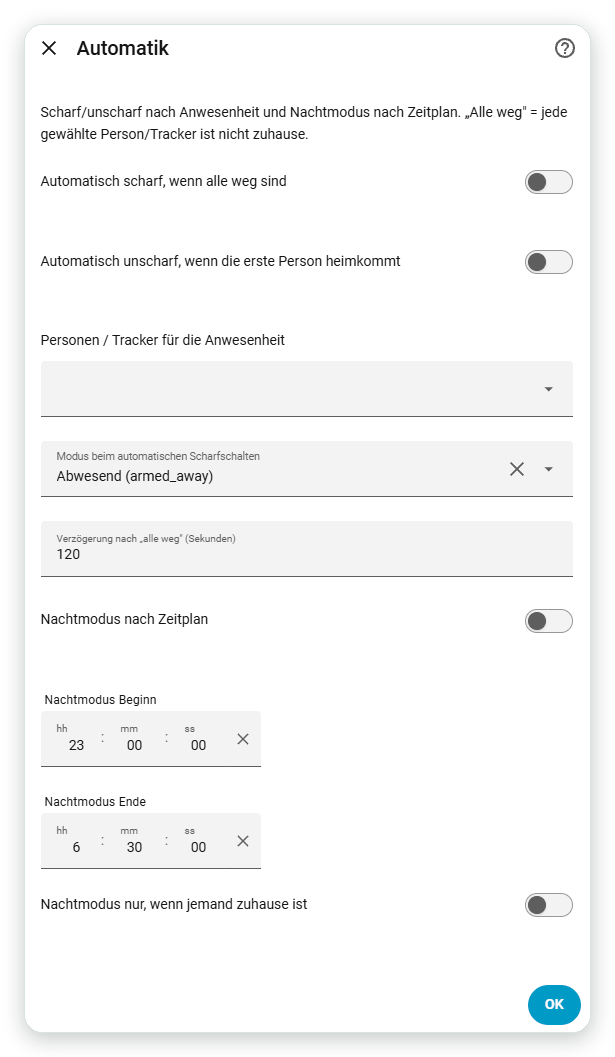
- Auto-arm when all chosen people/trackers have left the home zone – with an adjustable delay. If someone comes back during the delay, nothing happens.
- Auto-disarm the moment the first person arrives – even during the entry delay or an alarm.
- Night mode on a schedule (start/end), optionally only when someone is home.
The switches can also be flipped at runtime via the frickelalarm.set_automation service.
Tamper, panic & open sensors
- Tamper/signal loss: if a sensor becomes unavailable while the system is armed, you get a notification and the
frickelalarm_tamperevent. - Panic:
frickelalarm.panictriggers immediately (or a long press on the card). - Silence siren:
frickelalarm.silenceturns the actors off, the alarm keeps running silently. - Arm now:
frickelalarm.skip_exit_delayends a running exit delay at once. - Open sensors when arming are – depending on the setting – bypassed and reported; a bypassed sensor is monitored again automatically as soon as it closes.
Services & MCP – the special twist
Frickelalarm can be configured entirely through services, not just through the UI. That sounds unremarkable, but it has a nice effect: via the Home Assistant MCP server, a language model (e.g. Claude) can set the system up and operate it – add sensors, set times, arm/disarm, panic. That's exactly what comparable solutions can't do.
frickelalarm.add_sensor/remove_sensorfrickelalarm.set_times,frickelalarm.set_reactions,frickelalarm.set_automationfrickelalarm.bypass/clear_bypassfrickelalarm.panic/silence/skip_exit_delayfrickelalarm.get_config(returns the whole current state)
It also fires events for the logbook and your own automations: frickelalarm_armed/arming/pending/triggered/disarmed and frickelalarm_tamper.
Get involved
This is a hobby/learning project of the Frickelfabrik and explicitly a beta – for trying out, breaking and reporting back. There's Alarmo, a mature and very popular solution with a similar feature set; Frickelalarm is built from scratch on purpose (learning, full control, a few own touches – and that MCP twist).
Ideas, bug reports and testers are welcome – best via the issues on GitHub.
Screenshots are from a German Home Assistant; the UI follows your HA user's language.
 Eine Kamera für draußen gesucht?
Comments
No comments yet. Be the first.
Leave a comment
Commenting needs a free account. You sign in with a link by email, no password.
Sign in to comment