 Frickel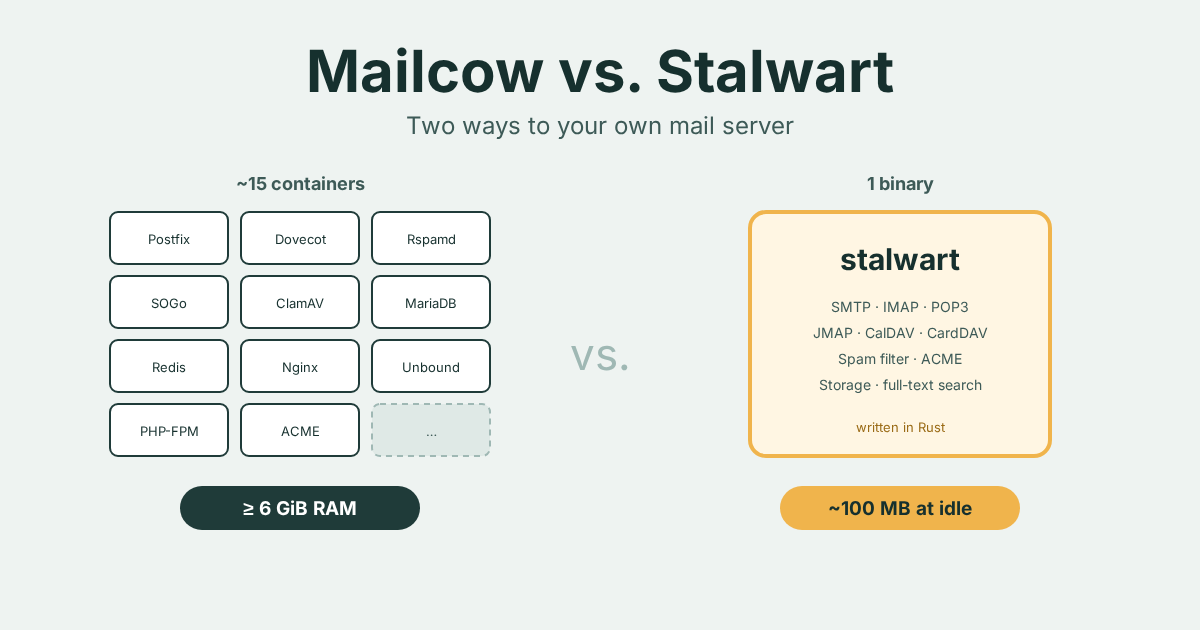
Deutsche Fassung dieses Beitrags lesen
Mailcow vs. Stalwart – and why I chose Stalwart
Fifteen containers or a single program? An honest comparison of the two most interesting ways to run your own mail server – with strengths, weaknesses and my decision.
"Never run your own mail server." You hear this in every forum as soon as someone brings up the subject. And it is not entirely wrong: email is one of the oldest protocols on the net, full of legacy baggage, and the big providers are suspicious of anyone they do not know.
I did it anyway. My first installation ran Mailcow, and I have since settled on Stalwart. In this post I compare the two honestly, as of October 2026, and explain why I chose the way I did. Spoiler: there are good reasons for both.
Two philosophies
Both projects want the same thing: a complete mail server that you run yourself. The way they get there could hardly be more different.
Mailcow is a kit of proven individual parts. Postfix receives and sends mail, Dovecot manages the mailboxes, Rspamd filters spam, ClamAV looks for viruses, SOGo provides webmail, calendar and contacts. On top of that come MariaDB, Redis, Nginx, a dedicated DNS resolver and an admin interface written in PHP. Each of these parts runs in its own Docker container, held together by Docker Compose. In total there are around fifteen containers.
Stalwart takes the opposite approach: a single program written in Rust. SMTP, IMAP, POP3, JMAP, CalDAV, CardDAV, WebDAV, spam filter, certificate management, storage and full-text search – all in one binary. No interplay of components that have to configure each other.
You could say: Mailcow is a well-rehearsed band. Stalwart is a solo artist who plays all the instruments.
The comparison
| Mailcow | Stalwart | |
|---|---|---|
| Architecture | ~15 Docker containers | one binary (or one container) |
| Language | C, PHP, Lua and others (per component) | Rust |
| RAM | at least 6 GiB + 1 GiB swap, 8 GiB recommended | ~100 MB at idle, 1 GB is enough for 5–10 users |
| Protocols | SMTP, IMAP, POP3, ActiveSync, CalDAV, CardDAV | SMTP, IMAP, POP3, JMAP, CalDAV, CardDAV, WebDAV |
| Webmail | SOGo, included | none – you need Roundcube, SnappyMail or similar |
| Spam filter | Rspamd | built in |
| Antivirus | ClamAV, built in | not built in, can be connected via milter |
| Storage | file system + MariaDB | your choice: RocksDB, PostgreSQL, MySQL, SQLite, S3 and others |
| Certificates | ACME, built in | ACME, built in |
| Version status | monthly releases, in production for years | 0.16.x, version 1.0 in the works |
| License | GPL-3.0 | AGPL-3.0 + Enterprise Edition |
| Behind the project | The Infrastructure Company GmbH | Stalwart Labs |
Where Mailcow shines
Everything is there. After installation you have webmail, calendar, contacts, antivirus and spam filter. With SOGo you even get ActiveSync for phones that would rather speak Exchange.
It is battle-tested. Postfix and Dovecot have been the backbone of countless mail servers for decades. Whatever error message you get, someone has googled it before you. The documentation is extensive, the community is large.
It is maintained. New versions appear roughly monthly, security updates promptly. The update script takes a lot of work off your hands. And the project is backed by a company from Germany – for some people that is a real argument.
Where Mailcow hurts
Hunger. The official requirement is at least 6 GiB of RAM, and for a handful of users 8 GiB is recommended. SOGo alone starts 20 workers by default, and each of them can take a good 350 MiB. ClamAV and full-text search are not frugal either. You can switch them off, but then something is missing.
Honest confession: my first Mailcow installation ran on a VPS with 4 GB. It worked, but it was never relaxed.
Many moving parts. Fifteen containers means fifteen places where something can jam. When an update stalls, you first have to find out which container is to blame. On top of that, Mailcow does not like to run on anything other than a full VM: LXC containers in Proxmox, for example, are explicitly not supported.
A lot of legacy under the hood. This is not a reproach but the flip side of "battle-tested": Postfix, Dovecot and Rspamd each have their own configuration language, their own logs and their own quirks. Mailcow hides much of that cleverly. But when you do have to dig deeper, you have to understand everything.
Where Stalwart shines
Lean. Around 100 MB of memory at idle. One gigabyte is enough for a small household or club. For me, running many services side by side on a Proxmox host, that makes a huge difference.
One part, one log, one configuration. No guessing which component is at fault. One service, one configuration, one web interface for everything.
Modern. Stalwart speaks JMAP, the modern successor to IMAP. JMAP works with JSON over HTTP, is more efficient and far more pleasant for anyone who wants to build their own tools. Stalwart passes the complete official JMAP test suite. Add things like OIDC login, a command-line tool of its own and an administration that itself runs over JMAP.
Flexible storage. For a single machine the built-in RocksDB is enough. If you think bigger, you can use PostgreSQL, S3-compatible storage or clusters – without changing the product.
Rust. For a service that takes unfiltered data from the internet day and night, a memory-safe language is a real security argument. Whole classes of bugs that keep causing vulnerabilities in C programs simply do not exist here.
Clean migration. For moving from an existing server there is a migration proxy: the new server takes over receiving mail immediately, and the accounts move over one by one – with a way back if something goes wrong. The mail clients hardly notice.
Where Stalwart (still) hurts
It is 0.x. The current version series is 0.16. The developers are working towards 1.0 and above all want to finalize the database schema. Until then, updates can still require manual work. One example from August: anyone running Stalwart with MySQL or MariaDB had to run ALTER TABLE commands themselves during an update. Anyone using RocksDB was not affected – but the rule still applies: read the release notes before every update.
No webmail. A webmail client of its own is planned, but only after version 1.0. Until then you need something extra, for example Roundcube or SnappyMail. If you want to promise your users "just read mail in the browser", that is one more component for you.
No built-in antivirus. If you want to scan attachments, you have to connect ClamAV or something similar yourself.
Open core. The Community Edition is licensed under AGPL-3.0 and can do everything you need for a private server or a club. A few features are only in the paid Enterprise Edition, though, for example multi-tenancy, archiving and restoring deleted mail, or AI-assisted spam filtering. The developers promise that existing open-source features will not move behind a paywall. You should still know about it.
Smaller community. Fewer forum posts, fewer guides, fewer "I had that too". If you get stuck, you end up in the official support forum or on GitHub sooner.
What is the same for both
No mail server in the world takes away the real work: making sure the big providers trust you.
- Outbound port 25: Many VPS providers block it by default. Check before installing, or you will wonder for a long time.
- Reverse DNS (PTR): The IP address must point back to the mail server's hostname. For IPv4 and IPv6. I had to learn that myself: Gmail rejected my mail until the PTR record for the specific IPv6 address was set – not just for the network around it.
- SPF, DKIM, DMARC: Without these three you land in spam or get rejected outright. Both systems generate the DKIM keys and show the DNS records you need. You have to enter them yourself.
- MTA-STS and TLS-RPT: Optional but recommended. Both systems support them.
- Reputation takes time. A fresh IP address has no reputation. Even a perfect configuration can land in the spam folder at first.
My decision
I chose Stalwart. The reasons:
- Resources. In my small data center many services run side by side. A mail server that is happy with one gigabyte instead of demanding six leaves room for everything else.
- Overview. One program instead of fifteen containers fits the way I like to run things: I want to understand what is running.
- JMAP. I like building my own tools. A mail server you can talk to cleanly over JSON is a much better foundation for that than IMAP.
- I hardly need webmail. I read mail on my phone and on my computer. For the rare cases, a lean webmail on the side is enough.
- I like being early. That Stalwart is still before 1.0 is no deal-breaker for me. I read the release notes, take a snapshot of the VM before updates and pin the version instead of blindly pulling the newest.
Who should pick what?
Pick Mailcow if …
- you want a complete solution with webmail, calendar and antivirus right away and without extra work,
- you look after users who just want mail that works,
- you have enough RAM to spare,
- maturity and a large community matter more to you than leanness.
Pick Stalwart if …
- your server is tightly sized or carries many other services,
- you want a modern, unified system instead of a zoo of components,
- you are interested in JMAP or want to connect your own tools,
- you can live with a 0.x version and the occasional manual work during updates.
Conclusion
Mailcow is the proven family estate car: roomy, reliable, but thirsty. Stalwart is the light electric runabout: modern, frugal, fast – but the charging infrastructure is still being built.
Both get you where you are going. For the Frickelfabrik it became the runabout.
How the installation works step by step is covered in the tutorial: installing Stalwart – from an empty server to the first mail (in German).
As of October 2026. Both projects are evolving quickly, Stalwart in particular on the way to version 1.0. Figures on memory and features come from the official documentation and release notes.
Sources: Mailcow – system requirements · Mailcow release 2026-07a · Stalwart – the road to 1.0 · Stalwart – roadmap and webmail · Stalwart – Community vs. Enterprise · Stalwart – migration guide · Stalwart v0.16.19 release notes